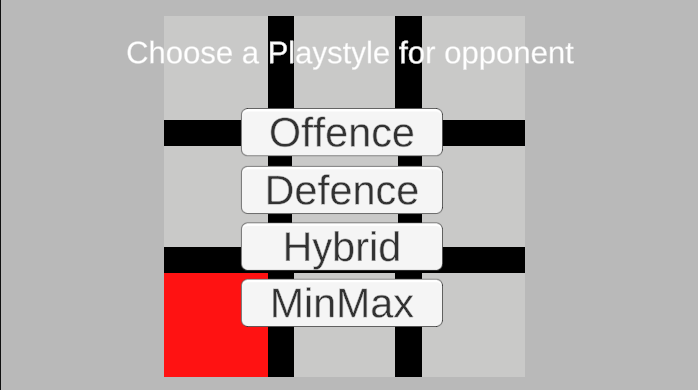
Tic Tac Toe gameplay screenshot

Tic Tac Toe Game

This is a classic implementation of the Tic Tac Toe game built with Unity and C#. The game features traditional gameplay where two players take turns marking spaces in a 3×3 grid, with the goal of getting three marks in a row. The AI opponent can use multiple different strategies, including the MinMax algorithm with game tree traversal, to make optimal moves, creating a challenging and strategic gaming experience.
Technologies Used

Tic Tac Toe gameplay screenshot
Tic Tac Toe game screenshot
Live gameplay demonstration with MinMax AI
Classic 3x3 grid gameplay interface
Game interface

Having trouble loading the game? Play directly on Itch.io

There is a issue with the website version not loading the Ai's moves on the first game

Challenges Faced

During development, I encountered several technical and design challenges that tested my problem-solving skills and pushed me to learn new concepts.

🤖

Hard coded AI moves

My first iterations of opponent AI's, the Offense, defense and hybrid AI were hard coded to make specific moves. This made them predictable and easy to beat. After some research into AI algorithms, I decided to implement a MinMax algorithm with game tree traversal to make the AI more challenging and unpredictable.

⌨️

Navigating the Board

I didnt want to use buttons for each square so that i could use bigger boards if i wanted to, so i went with arrowkey movement. This required implementing a system to track the current position on the board and update it based on player input, ensuring smooth navigation across the grid.

🔄

Recursive Algorithm Complexity

Implementing the MinMax algorithm required understanding recursion and game tree traversal. Debugging recursive functions was challenging, especially ensuring the algorithm correctly evaluated all possible game states and returned the optimal move for the AI.

Reflections

🏗️

Better code organization

Because I made the Hardcoded AI's first, I had to refactor the code to accommodate the new MinMax AI. This taught me the importance of planning and structuring code for scalability and maintainability from the start.

🖱️

Intuitive Interaction

Should have used mouse clicks for selecting squares instead of arrow keys, as it would have been more intuitive for users. This would have made the game more accessible and user-friendly.

👥

Feedback on who's turn it is

Implementing a visual indicator for the current player's turn would enhance the user experience and make the game more intuitive.

🎨

More Appealing UI

Improving the visual design and aesthetics of the game interface would enhance the overall user experience and make the game more engaging.

🌐

Platform Compatibility

Learning about WebGL builds and the differences between desktop and web versions. The web version has some issues with AI initialization that don't occur in the desktop build.

Future Improvements

In the future, I would like to add more features such as multiplayer support, a more advanced AI with different difficulty levels and diffrent grid sizes, and a more polished user interface.